Plugins
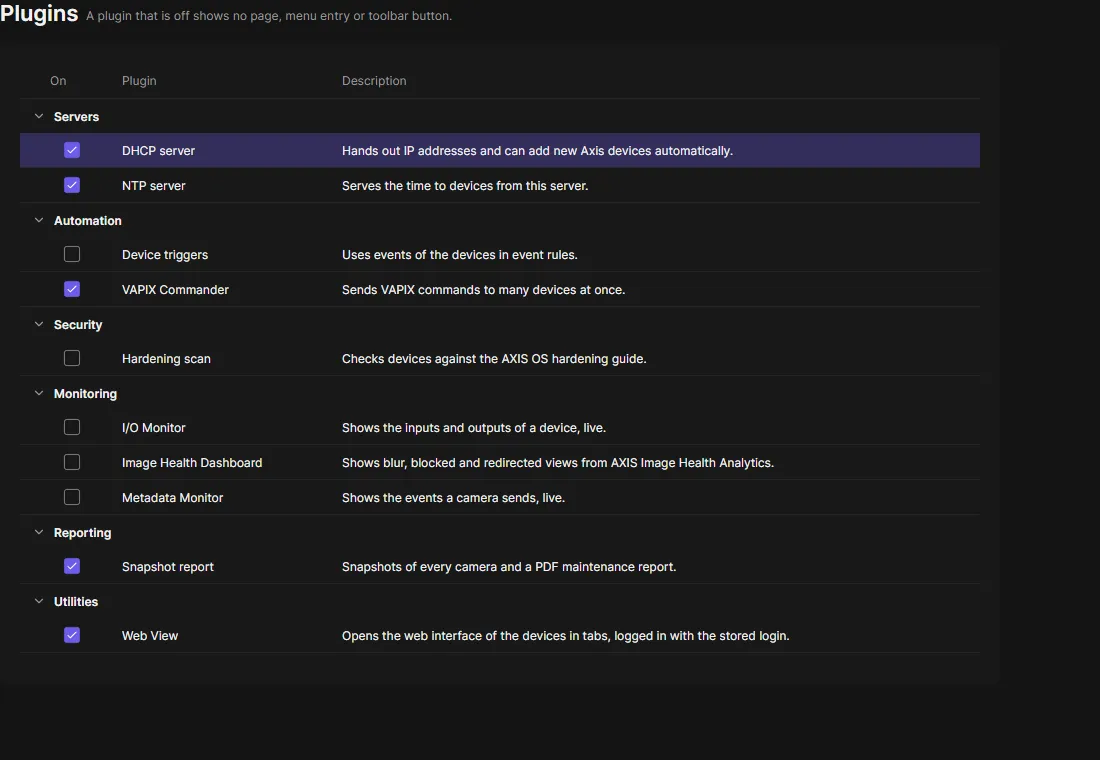
The Plugins page lists the plugins you can turn off, each with a short description. Only administrators see it.
Turn a plugin on or off with its check box. The server applies the change at once, without a restart, and writes it to the audit log. A plugin that is off shows no page, menu entry or toolbar button, and the server does not run it. Other clients see the change the next time they connect.
| Plugin | Default |
|---|---|
| Snapshot report, VAPIX Commander, NTP server, DHCP server, Web View | On |
| Device triggers, Edge Recording Export, Edge storage, Hardening scan, Image Health Dashboard, I/O Monitor, Live View, Metadata Monitor | Off |
Restart, Upgrade firmware, Date and time, Device configuration, Applications (ACAP), Users, Network settings, PKI, System report, Outputs and Notifications are the everyday device work. They are always on and not listed.
Plugins from others
Section titled “Plugins from others”You can add plugins that do not come with OADM: copy the plugin’s folder into the plugins folder next to the OADM
server (and next to the client, when the plugin has a dialog or a page), then restart both.
Install only plugins you trust, as you would any program on the server:
- A plugin runs inside the OADM server with the server’s rights: as the installed service that is Local System on Windows and root on Linux and macOS. It can reach the network, the files of the server and every device OADM manages, logged in with the stored passwords (it never sees the passwords themselves).
- Off on this page stops what the plugin runs and hides it, but its code stays loaded until the server restarts. To remove a plugin, delete its folder and restart the server and the clients.
- As a service, OADM makes every plugin folder writable only by administrators when it starts. A folder it cannot fix is not loaded, and the server log names it.
- Plugins that come with OADM are reviewed and tested with every release. For one from somewhere else, ask for its source and who checked it.