Image Health Dashboard
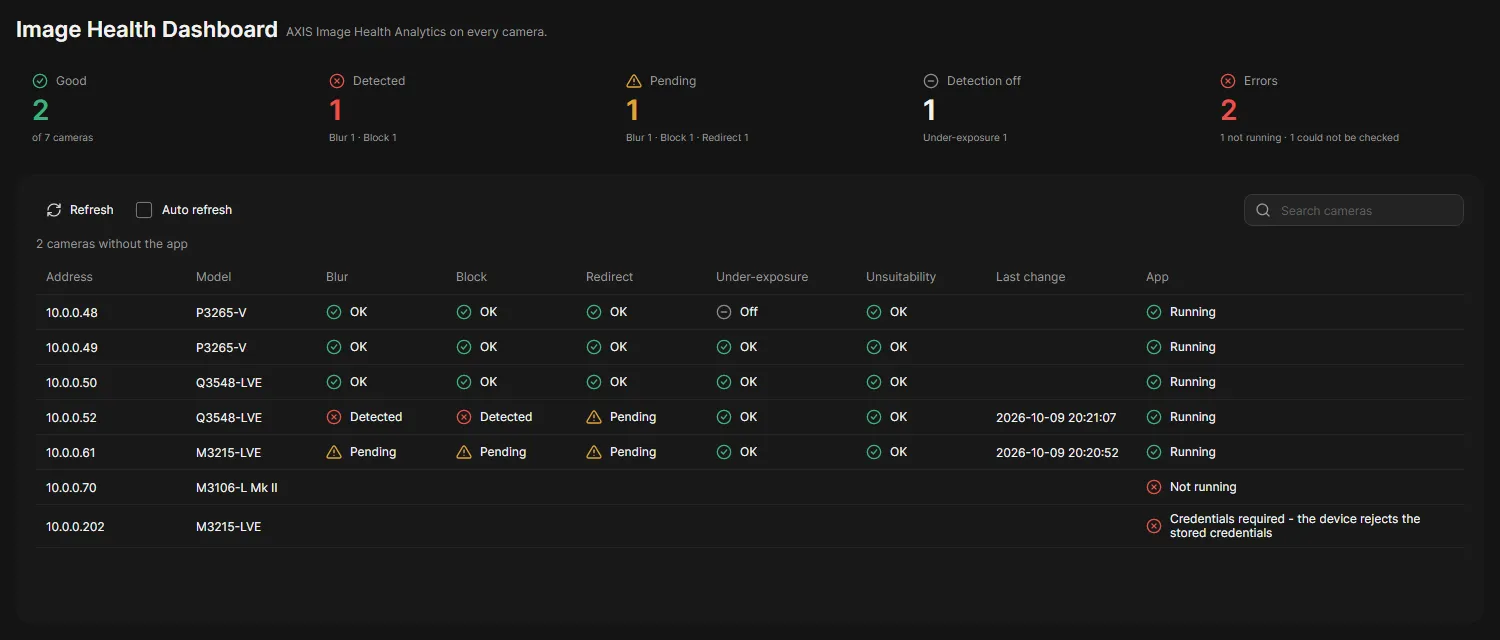
The Image Health Dashboard shows what AXIS Image Health Analytics reports on each camera: blur, a blocked view, a redirected camera, under-exposure and an unsuitable scene. One row per camera that has the app.
Check your cameras
Section titled “Check your cameras”-
Open Image Health Dashboard in the navigation rail.
OADM asks every camera once. The progress row counts the cameras.
-
Read the cards above the table. Each camera with the app counts in one of Good, Detected, Pending and Errors, the worst state wins:
- Good: the app runs and found nothing. A detection turned off in the app does not count against the camera.
- Detected, Pending: the line below the count says which detections.
- Errors: the app is not running, or OADM could not read the camera.
- Detection off: cameras with at least one detection turned off, counted on top of the other cards.
-
Read the table. Each detection shows:
- OK: nothing found.
- Pending: the app saw something and waits to confirm it.
- Detected: the app confirmed it.
- Off: the detection is turned off in the app.
-
Click Refresh to ask every camera again, or turn on Auto refresh to ask every 10 seconds while the page is open.
The App column shows Running, Not running (the app is installed but stopped), or why OADM could not read the camera. Last change shows when a detection changed between two checks. The line above the table counts the cameras without the app. The cards always count every camera, also while you search.
Good to know
Section titled “Good to know”- OADM asks the cameras only when you open the page, click Refresh or turn on Auto refresh. Nothing runs in the background, and nothing runs after you leave the page.
- To react to blur and the other detections in event rules, create a device trigger on an event of the app, for example Image Health Analytics - Blur or Image Health Analytics - Any-Active-Events.
- Cameras without the app are counted but not listed.
- OADM asks 24 cameras at a time and waits at most 3 seconds for each.
- The dashboard only reads. It never changes a camera or the app settings.
- Devices that need a login, have no password yet, have a changed certificate or do not answer show the reason.