Edge storage
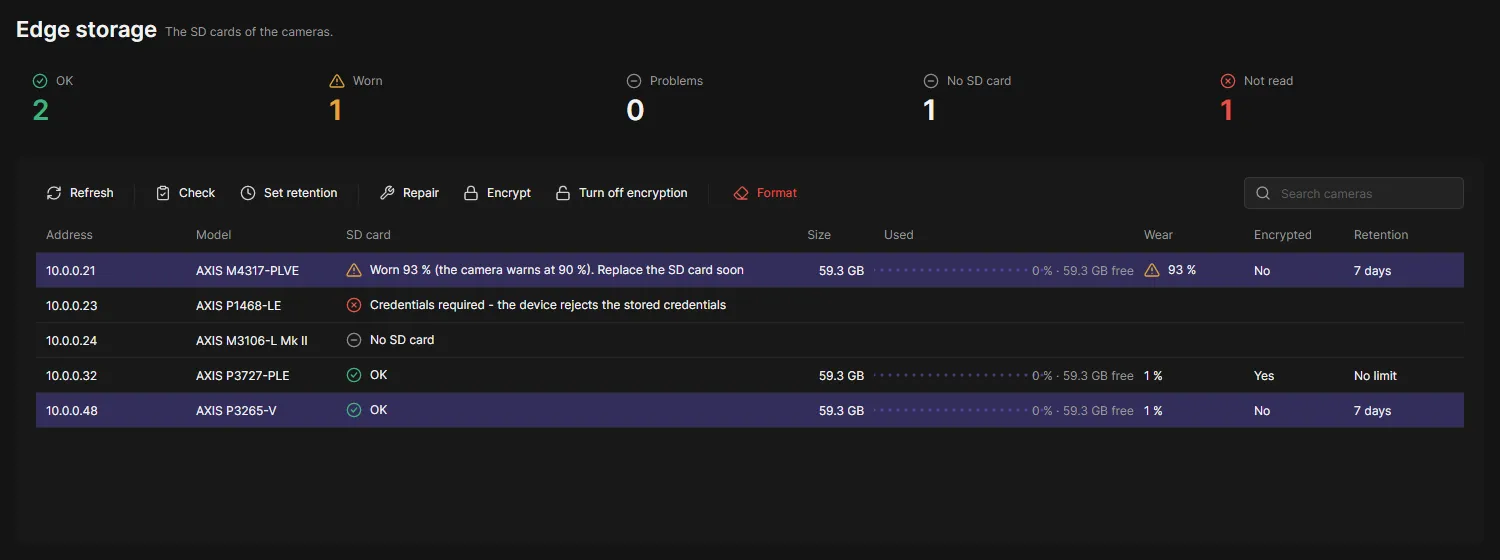
Edge storage shows the SD card of every camera: its state, size, how full it is, how worn it is, whether it is encrypted and how long recordings are kept. The tools of the camera’s web interface work on many cameras at once.
Check your SD cards
Section titled “Check your SD cards”-
Open Edge storage in the navigation rail.
OADM reads every camera with an SD card slot once. The progress row counts the cameras.
-
Read the cards above the table:
- OK: the card is in use and fine.
- Worn: the card has used up as much of its life as the camera warns at (usually 90 %). Replace it soon.
- Problems: the camera cannot use the card, for example it failed, is read-only or encrypted with another passphrase. The SD card column says why.
- No SD card: the slot is empty.
- Not read: OADM could not read the camera, for example because it rejects the stored login.
-
Click Refresh to read every card again.
Change the SD cards
Section titled “Change the SD cards”Select the cameras in the table, then choose a tool. Each camera gets its own task; the tasks pane below the table shows the progress.
| Tool | What it does |
|---|---|
| Check | Checks the card for errors. Recording stops until the check is finished. |
| Set retention | How many days recordings are kept (1 to 7,000), or no age limit: then the camera keeps them until the card is full. |
| Repair | Repairs a damaged card. Damaged recordings can be lost. |
| Encrypt | Encrypts the card with a passphrase. The card is formatted: every recording on it is deleted. Keep the passphrase: the card cannot be read in another camera without it. |
| Turn off encryption | The card is formatted without encryption: every recording on it is deleted. |
| Format | Formats the card: every recording on it is deleted. |
OADM asks before every tool. Check, Repair, Format and encryption take the card out of use while they run and put it back in use when they are done, also when something fails.
Good to know
Section titled “Good to know”- OADM reads the cameras only when you open the page or click Refresh. Nothing runs in the background.
- Cameras with a changed certificate, rejected credentials or no password yet are not contacted.
- Operators may check cards and set the retention. Format, repair and encryption are for administrators unless a role allows them (“Format and encrypt storage” on the Users page).
- The passphrase is not stored by OADM.
- Network shares are not shown.