Set up a site
Three steps: install the node at the site, point it to the server, bind it on the Sites page.
1. Install the node
Section titled “1. Install the node”Download the site node from the latest release.
- Download
OADM-SiteNode-<version>-win-x64.msiand double-click it. - Finish. The Windows service OADM Site Node starts now and on every boot.
- Start menu > OADM Site Node opens the app. It asks you to accept the terms of use once.
- Silent install with the server’s address:
msiexec /i OADM-SiteNode-<version>-win-x64.msi SERVER=oadm.example.com /qn. - Data folder:
%ProgramData%\OADM Site Node. Uninstalling keeps it.
Debian and Ubuntu (also Raspberry Pi OS), x64 (amd64) or ARM64 (arm64). Download both .deb files of your
computer’s type:
sudo apt install ./oadm-site-node_*.deb ./oadm-site-node-app_*.deb # service and appsudo apt install ./oadm-site-node_*.deb # service only, no desktop- Service:
oadm-site-node(sudo systemctl status oadm-site-node). It runs as its own user, not as root. - App: app menu > OADM Site Node, or
oadm-site-node-app. - Data folder:
/var/lib/oadm-site-node. Uninstalling keeps it.
2. Connect the node to the server
Section titled “2. Connect the node to the server”- In OADM, open Sites and click Accept site nodes (administrators).
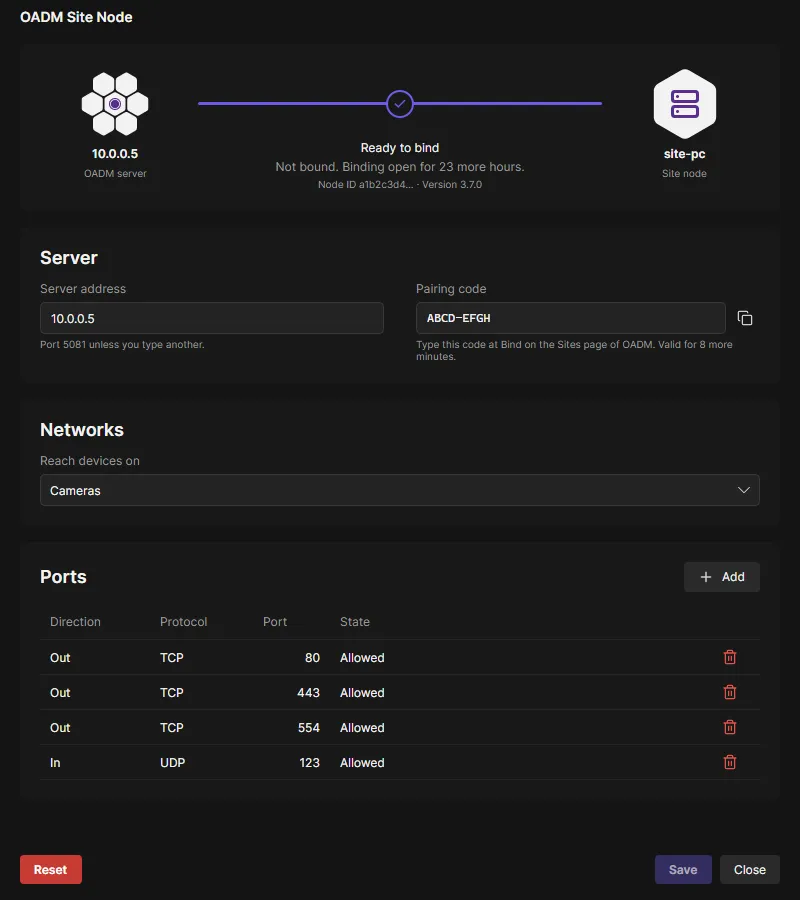
- In the node app, enter the server’s name or IP address under Server address and click Save. Port 5081 unless you enter another one. Windows asks for administrator rights, Linux for your password.
- The line at the top of the app turns purple: Ready to bind. On the Sites page the node shows as Waiting to be bound.
Enter the server’s DNS name if it has one. The node also learns the server’s other addresses and finds it again when its address changes.
3. Bind the site
Section titled “3. Bind the site”- In the node app, read the Pairing code next to the server address (the copy button copies it). A code is valid for 10 minutes; the app shows the next one by itself.
- On the Sites page, click Bind on the node’s row.
- Enter the Site name and the Pairing code and click Bind.
The line in the node app turns green: Connected. From now on the node works only with this server. Add devices at the site like any other devices: Discovery, Network range and Add manually also search through the node.
- Binding is open for 24 hours of the node’s run time. Then the app says Binding is closed: click Allow binding for another 24 hours and a new code.
- After 5 wrong codes the node makes a new code and refuses binding for 10 minutes.
- On a computer without a desktop:
oadm-site-node server oadm.example.com, thenoadm-site-node pairing-code(see the command line).